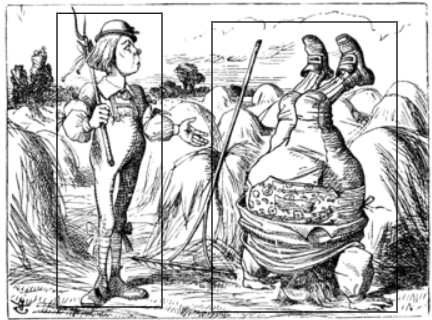
Last night, I had a joint debugging session with ChatGPT-4 which provided an excellent example of how to collaborate productively with an AI. We are currently implementing support for a new C-LARA feature which will allow people to designate mouse-sensitive areas in images so that each area is associated with a phrase, and appropriate things happen when you hover over or click on the area. Our running test example is the above image, where the two rectangles are meant to be associated with the phrases “son” and “Father William”.
The thing we were stuck on was that the image didn’t seem mouse-sensitive at all. I had no idea what the problem was, since we were using some HTML elements that I had no experience with. Chat had several suggestions, but none of them seemed to lead anywhere. It was extremely frustrating; for a while, we couldn’t see how to make progress.
Moving my mouse around at random, I noticed that in fact it wasn’t true that there was no mouse-sensitivity: every now and then, a popup briefly appeared. Further investigation determined that the mouse-sensitive area was the exact border of the “son” image. There was, however, no corresponding area in the “Father William” image. This gave us data to work with.
Chat was still suggesting generic lines of investigation which seemed to me quite unpromising, but I thought I saw a better approach. I suggested that we could make a copy of the HTML, strip out all the irrelevant content, and then start rearranging things to find out what happened. Chat immediately agreed. We removed the “son” part of the HTML and discovered that we now got mouse-sensitivity around “Father William” instead. Reversing the order of the two component pieces of HTML left us with mouse-sensitivity around “Father William” and none around “son”.
Having reached this point, we had enough information that Chat was able to diagnose the problems. The second image was blocking the first because we had nested the <svg>, <g> and <rect> tags incorrectly; also, we were only getting mouse-sensitivity on the edge of the image because we had set the ‘fill’ attribute to ‘none’, whereas in fact it needed to be a transparent null colour. It would have taken me hours of Google searching to come up with these solutions, but Chat’s knowledge of web application programming is very wide-ranging and it found both of them at once.
This pattern, where I make the big-picture decision (here, suggesting an appropriate debugging strategy) and Chat takes care of the details (here, finding the right tweaks to the code) is very common. We each have our own strengths, and by working together we cover each other’s weaknesses.
There are some high-profile theoreticians who like to write articles “proving” that large language models like Chat “don’t really understand anything”. I would be interested to see if they were still of that opinion after a few days of pair-programming together with the AI.

 C-LARA
Leave a comment