We now have a first version of the “coherent image set” functionality installed on the C-LARA server. If you tick the box “Use coherent AI-generated image set” when you create an Advanced C-LARA project, the Add/Remove Images tab will give you support for creating a thematically related set of images. You first provide a prompt to create an image which will define the visual style for the text’s illustrations. C-LARA creates the image, then analyses it to obtain a detailed description of the style. It then adds this to the prompts used for all the other images.
You can see the first text generated using this method here; it’s another nice-people-get-together-to-save-the-world effort by ChatGPT-4. Both the story, and the prompts used to create the images, were generated by the AI. It evidently isn’t very good. The style, which is required to be manga-inspired, was set by this initial image:
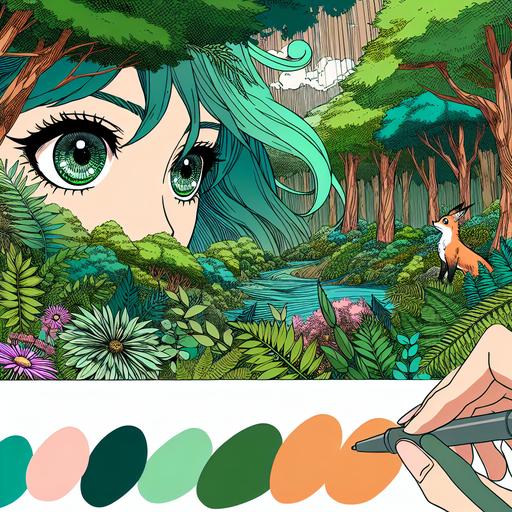
If we look at a couple of images from the actual text, say the ones from pages 4 and 5 below:
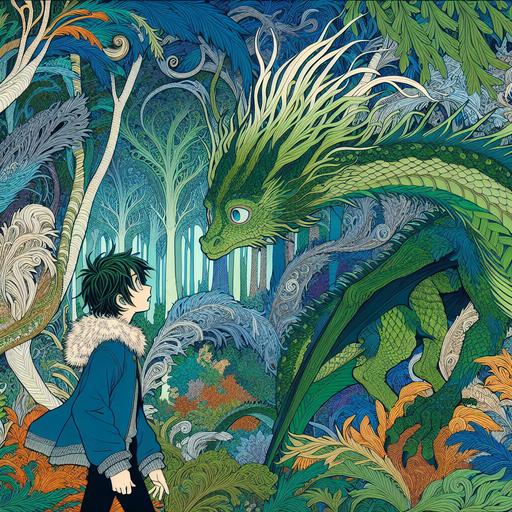
Page 4: One day, while wandering deeper in into the forest than even before, she discovered a dragon who had lost his way.
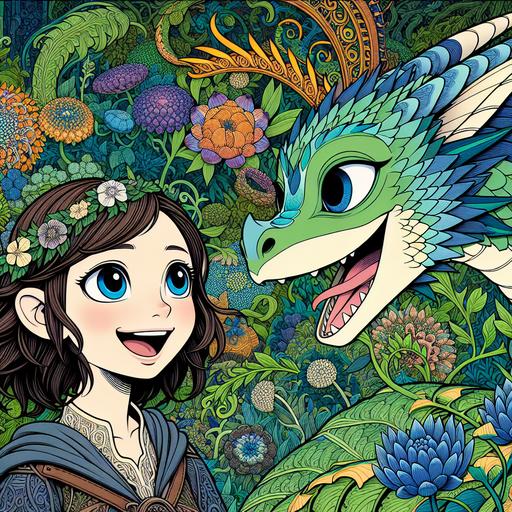
Page 5: The dragon, named Fern, was not like the fearsome dragons of old tales. He was gentle and kind, with emerald green scales that shimmered in the sunlight.
we see that AI isn’t doing such a bad job of keeping the style uniform. But it’s immediately apparent that the style isn’t enough. We also need to keep the appearances of the characters uniform: Princess Elana and Fern the dragon look completely different in the two images.
So we need a way to do that too, and there’s an obvious approach: as we did with the style, we ask GPT-4o to look at one image and create a detailed description, then we include that description in the prompts used to create the other images. I’m going to talk with the AI now about how we might implement this scheme. Hopefully we’ll have a new version in a couple of days which is substantially better.
Interested to hear comments and suggestions!


 C-LARA
Leave a reply to cathyc Cancel reply